

Often I’m asked a question like, “How can I rank within a 40-mile radius of my business for [such-and-such service/keyword]?” Or maybe it’s a 10-mile radius, or a 70-mile one, or a ring of suburbs. The point is there’s a specific geographical area where you want to be visible to customers in the local search results, and you want to know how to cover as much of it as possible.

Here’s what I’ve found: you’re unlikely to dominate for all your BIG search terms throughout your whole service area. At least not in the Google Maps / 3-pack results, and at least not if you’re in a competitive industry or competitive area. Instead, you need to think in terms of rings, or layers, or zones – different areas where you can realistically rank for different types of local search terms. For some services you’ll rank only within a few miles, and for others you can pretty much blanket your service area. Sometimes you’ll rank in the Maps 3-pack, other times you’ll rank in the localized organic results, and other times neither or both.
Let’s say you own a plumbing company, and let’s say you’re in or very near Columbus, OH. You want to rank within a 40-mile radius of your office for terms like “plumber,” “plumbing,” “plumber near me,” etc. The chances of that are slim to none. Why? Because Google probably has a lot of other plumbers to choose from and to show in that area. Google can be picky to the degree it expects customers will be picky, which is why some search terms are more location-sensitive than others. That’s also why you might only rank in roughly a 5-mile radius for your most competitive terms, IF you do everything right (and if you don’t spam the map). In general, it’s not possible to rank throughout your 40-mile-radius service area on the map and for super-competitive search terms.
But do you know what is possible? Filling in the rest of your service area with rankings for your other services, and with organic (non-Maps) rankings? Close to your HQ certain rankings are possible. Farther away from your HQ other rankings are possible. You can save yourself a lot of frustration and rustle up a lot more visibility and business if you tailor your goals to different zones within your service area.
Here’s a rough, probably over-simplified sketch that shows what I’m talking about. This is based on the “plumber in Columbus OH” example from a minute ago.

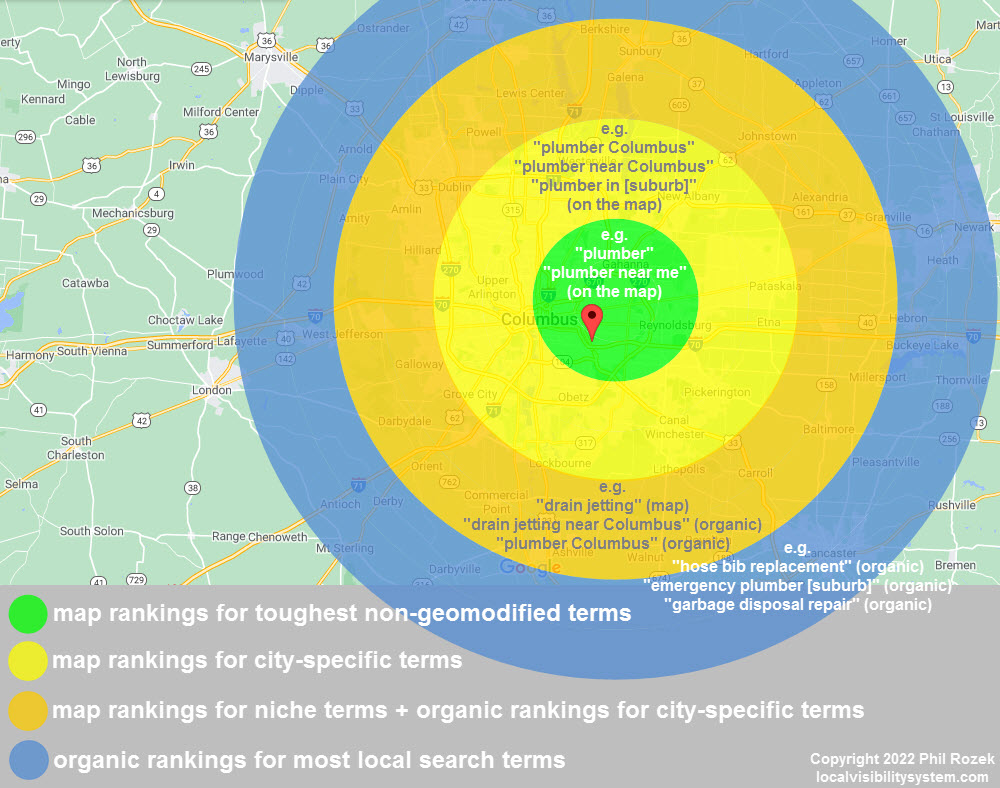
The green ring represents the search terms for which you’ve got the most competitors nearby. Those tend to be terms that people in a more-urban environment are likely to type in, where distance matters more – either to the customer or to you (like if traffic and drive time are concerns). These terms also tend not to include the name of the city or other geomodifiers (think “plumber” rather than “plumber Columbus”), so Google tends to favor results that are closest.
The yellow ring represents terms that are somewhat less location-sensitive. In our example, here’s where you might realistically rank on the map for “plumber Columbus” but won’t show up on the map to everyone who’s sitting in Columbus who types in “plumber.” In the same way, you have a good chance of ranking on the map and in the organic results in the suburbs, like for a search term like “plumber Westerville.”
The orange ring is where you usually won’t rank on the local map for your highest-priority search terms, and where the goals are to rank on the map for more-specialized services or products and (if possible) to rank in the organic results for your most-competitive terms. The organic results are still location-sensitive, but less so than the Google Maps results, so you can rank in them farther away.

The blue ring is the zone in which you won’t rank in Google Maps for much (at least if you have only one location), but you can still rank in the organic search results for all kinds of local search terms – definitely the more-niche terms and maybe the broader, super-competitive ones. Your “blue zone” may be 20 miles away, or 40 miles away, or 60 miles away; it’s just the area where you stop ranking in the Google Maps, but where most of the people who find you are still local customers who could easily pick you over competitors who may be closer but not as appealing.
Again, my sketch is very stripped-down and simplified, because I’m trying to make a basic point: Google gets pickier in various ways as the customers or their search terms move farther away from the center of your service area. A more-accurate but probably more-confusing version of my graphic would look something like this:

It gets complex and messy fast. Where you can (realistically) hope to rank depends on where the customers are, where the tough competitors are, how many local competitors are spamming, whether you have additional locations, and whether searchers type in tricky modifiers like the name of a state or “emergency” or “best” or “cheap,” and many other variables.

What does all of that mean on a practical level? As in: what should you do? A few things:
- Only worry about your Google Maps rankings very close to your HQ, at least for your major terms. Don’t bother tracking or focusing much on your Google Maps rankings for broad, very location-sensitive queries in the outer rings of your service area, because you probably won’t rank for them.
- Make a page on every service you offer, link to it generously throughout your site, and describe your service area explicitly on that page.
- Make a page on each high-priority city in your service area, on each page describe or showcase your experience in that city, list each specific service you offer there and link to each “service” page, and link to each “city” page generously throughout your site.
—
What do your visibility “rings” look like?
What kinds of terms do you rank for in the inner rings vs. in the outer rings?
What has helped you maximize your visibility in this or that part of your service area?
Leave a comment!