
Website speed and user experience have always mattered for SEO, but Google’s Core Web Vitals transformed them from general best practices into specific, measurable ranking factors. Understanding what Core Web Vitals are, how they impact your search rankings, and how to optimize them is now essential for any website competing for visibility in search results.
This comprehensive guide explains Core Web Vitals in practical terms, shows you how to measure your site’s performance, and provides actionable strategies to optimize them and improve both rankings and user experience.
What Are Core Web Vitals?

Core Web Vitals (CWV) are a set of specific metrics that Google uses to measure real-world user experience on web pages. Introduced as official ranking factors in 2021, these metrics quantify how fast pages load, how quickly they become interactive, and how stable content remains as pages load.
Google defines three Core Web Vitals metrics:
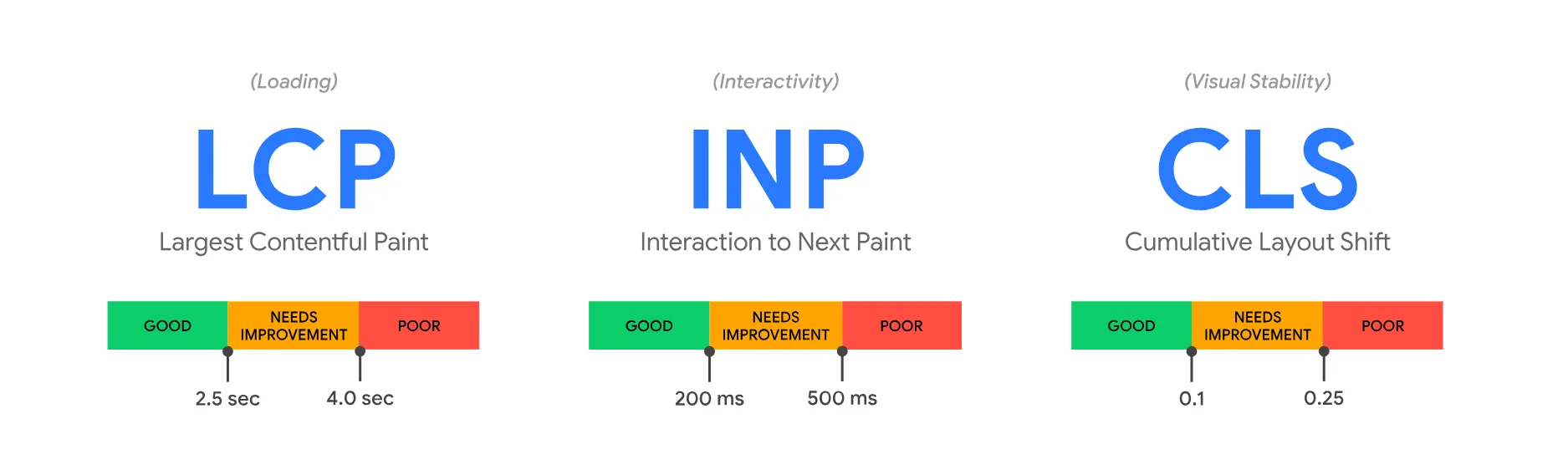
Largest Contentful Paint (LCP): It measures loading performance and tracks how long it takes for the largest visible content element to appear on screen. Good LCP occurs within 2.5 seconds of the page load starting.
Interaction to Next Paint (INP): It measures interactivity and responsiveness. INP replaced First Input Delay (FID) in March 2024 and assesses how quickly a page responds to all user interactions throughout the entire page visit. Good INP is 200 milliseconds or less.

Cumulative Layout Shift (CLS): It measures visual stability and quantifies the amount of unexpected layout shifting that occurs as page elements load. Good CLS scores remain below 0.1, indicating content doesn’t jump around during load.
These metrics matter because they directly impact user satisfaction. Pages that load slowly, respond sluggishly to clicks, or shift content unexpectedly create frustrating experiences that drive users away, and Google now penalizes such pages in search rankings.
Why Core Web Vitals Matter for SEO?
The SEO impact of Core Web Vitals extends beyond ranking factors. These metrics influence multiple aspects of search performance and business outcomes.
Direct Ranking Impact
Google explicitly confirmed that Core Web Vitals are ranking factors. Pages with good CWV scores receive ranking benefits, while pages with poor scores may rank lower even when content quality is strong.

The impact is particularly significant when multiple pages have similar content quality and relevance. Core Web Vitals serve as tiebreakers; the page offering a better user experience ranks higher.
Mobile Search Priority
Google uses mobile page experience for ranking across both mobile and desktop searches. Since Core Web Vitals measure real mobile user experiences, optimizing for mobile performance is critical even if most of your traffic comes from desktop.
User Experience and Conversions
Beyond SEO, Core Web Vitals directly impact business metrics:
- Bounce rates: Slow-loading pages cause users to abandon sites before the content appears.
- Conversion rates: Pages loading in under 2 seconds convert significantly better than slower pages.
- Engagement: Fast, responsive pages keep users browsing longer and viewing more pages.
- Revenue: E-commerce sites see measurable revenue increases when they improve their Core Web Vitals scores.
Competitive Advantage
Many websites still have poor Core Web Vitals scores, creating opportunities for sites that prioritize optimization. In competitive niches, superior page experience can differentiate your site from competitors with similar content quality.
Understanding Each Core Web Vital Metric

Effective Google Core Web Vitals optimization requires understanding what each metric measures and what causes poor scores.
Largest Contentful Paint (LCP)
LCP measures the time to first paint (TTFP) of the largest visible element on the screen. This element typically includes:
- Hero images or banners
- Large text blocks or headings
- Video thumbnails
- Background images with text overlays
LCP scoring thresholds:
- Good: 2.5 seconds or less
- Needs improvement: 2.5-4.0 seconds
- Poor: Over 4.0 seconds
Common causes of poor LCP:
- Slow server response times
- Render-blocking JavaScript and CSS
- Large, unoptimized images
- Slow resource load times
- Client-side rendering delays
Interaction to Next Paint (INP)
INP assesses responsiveness by measuring the latency of all user interactions throughout a page visit: clicks, taps, and keyboard inputs. It captures the worst interaction latency, providing insight into overall interactivity.
INP scoring thresholds:
- Good: 200 milliseconds or less
- Needs improvement: 200-500 milliseconds
- Poor: Over 500 milliseconds
Common causes of poor INP:
- Heavy JavaScript execution is blocking the main thread
- Large DOM sizes requiring extensive processing
- Expensive event handlers
- Long-running JavaScript tasks
- Inefficient third-party scripts
Cumulative Layout Shift (CLS)
CLS quantifies visual stability by measuring the amount of unexpected content shift during page load. Every unexpected shift receives a score based on its size and the number of affected items.
CLS scoring thresholds:
- Good: 0.1 or less
- Needs improvement: 0.1-0.25
- Poor: Over 0.25
Common causes of poor CLS:
- Images without defined dimensions
- Ads, embeds, or iframes without reserved space
- Dynamically injected content pushes existing content down
- Web fonts causing text to reflow (FOIT/FOUT)
- Actions waiting for network responses before updating the DOM
How to Measure Core Web Vitals
Before you can improve Core Web Vitals, you need to measure current performance and identify specific problems.
Google PageSpeed Insights
PageSpeed Insights provides the easiest way to check Core Web Vitals for individual pages. Simply enter any URL, and Google analyzes both lab data (synthetic testing) and field data (real user measurements from Chrome users).
The tool shows:
- Pass/fail status for each Core Web Vital
- Specific performance scores
- Detailed diagnostics identifying problems
- Actionable recommendations prioritized by impact
Use PageSpeed Insights to:
- Check Core Web Vitals for key pages
- Identify specific technical issues
- Get optimization recommendations
- Compare performance before and after changes
Google Search Console
Search Console‘s Core Web Vitals report shows how your entire site performs based on real user data from Chrome browsers.
The report categorizes URLs as:
- Good: Passing all three Core Web Vitals
- Needs improvement: At least one metric is in the needs improvement range
- Poor: At least one metric failing
Use Search Console to:
- Identify which pages have Core Web Vitals issues
- Monitor site-wide performance trends
- Validate fixes after implementing optimizations
- Prioritize which pages need immediate attention
Chrome User Experience Report (CrUX)
CrUX provides field data showing how real Chrome users experience your site. This data powers the Core Web Vitals scores shown in Search Console and PageSpeed Insights.
Access CrUX data through:
- PageSpeed Insights API
- BigQuery for detailed analysis
- CrUX Dashboard for visualizing trends
Web Vitals Chrome Extension
The Web Vitals Chrome extension provides real-time Core Web Vitals measurements as you browse your site. It displays current scores for LCP, INP, and CLS, updating as you interact with pages.
Use this extension to:
- Test pages immediately after making changes
- Identify which interactions cause INP issues
- See exactly when and where layout shifts occur
- Debug performance problems in your development environment
How to Improve Core Web Vitals?
Core Web Vitals optimization requires targeted technical improvements based on which metrics need work. Here’s how to address each metric systematically.
Improving Largest Contentful Paint (LCP)
Optimize your hosting and server response:
Slow server response times cause delays in all other processes. Upgrade to faster hosting, implement server-side caching, use a Content Delivery Network (CDN), and optimize database queries.
Eliminate render-blocking resources:
CSS and JavaScript files that must load before rendering can significantly delay LCP. Inline critical CSS, defer non-critical CSS, eliminate unused CSS, and defer JavaScript execution when possible.
Optimize images:
Large images often serve as the Largest Contentful Paint (LCP) element. Compress images without loss of quality, use modern formats like WebP or AVIF, serve responsive images with appropriate sizes for different devices, and use lazy loading for below-the-fold images.
Implement preload for critical resources:
Use to tell browsers to fetch critical resources immediately, particularly fonts and hero images that might be the LCP element.
Reduce JavaScript execution time:
Heavy JavaScript delays rendering. Minify JavaScript bundles, split large bundles into smaller chunks, remove unused code, and defer non-essential scripts.
Improving Interaction to Next Paint (INP)
Minimize JavaScript execution:
Long-running JavaScript tasks block the main thread and prevent pages from responding to user interactions. Break long tasks into smaller chunks, use Web Workers for heavy computation, and defer non-critical JavaScript.
Optimize event handlers:
Heavy event handlers responding to clicks, scrolls, or inputs create INP problems. Debounce or throttle expensive operations, use passive event listeners where appropriate, and avoid synchronous layouts that force reflows.
Reduce DOM size:
Large DOM trees require more processing for every interaction. Remove unnecessary elements, implement virtualization for long lists, and simplify page structure where possible.
Eliminate third-party script interference:
Third-party scripts often monopolize the main thread. Audit all third-party scripts, remove unnecessary ones, load remaining scripts asynchronously, and use facades for heavy embeds like social media widgets.
Implement code splitting:
Load only the JavaScript needed for the current functionality. Use dynamic imports for features users might not use, and implement route-based code splitting in single-page applications.
Improving Cumulative Layout Shift (CLS)
Set explicit dimensions on media:
Always specify width and height attributes on images and videos. Modern browsers use these dimensions to reserve space before content loads, preventing shifts.
Reserve space for ads and embeds:
Dynamically inserted content causes major layout shifts. Reserve space with min-height CSS properties, use placeholder elements with dimensions matching the final content, and avoid inserting content above existing content.
Avoid DOM insertions above existing content:
Never insert new elements above content that users might already be viewing. If you must add dynamic content, insert it below the fold or use overlays that don’t push content.
Handle font loading properly:
Web fonts can cause text to reflow when they load (Flash of Unstyled Text). Use font-display: optional for non-critical fonts, preload critical fonts, and ensure fallback fonts closely match the final font dimensions.
Ensure animations don’t cause shifts:
Animate properties that don’t trigger layout, like transform and opacity, rather than properties that cause reflows like width, height, top, or left.
Google Core Web Vitals Optimization Best Practices
Beyond addressing specific metrics, these general practices improve overall Core Web Vitals performance:
Implement a Performance Budget
Establish maximum sizes for resources:
- Total page weight under 1.5MB
- JavaScript bundles under 200KB
- CSS files under 100KB
- Individual images under 200KB
Monitor bundle sizes during development and reject changes that exceed budgets without clear justification.
Use Modern Image Formats and Techniques
Implement responsive images using srcset and sizes attributes, adopt WebP format with fallbacks for older browsers, use AVIF for even better compression where supported, and implement lazy loading for images below the fold.
Minimize Third-Party Impact
Third-party scripts frequently cause issues with Core Web Vitals. Audit all third-party tools, remove those providing limited value, load remaining scripts asynchronously, implement facades for social media embeds, and self-host critical third-party resources when possible.
Optimize for Mobile First
Since Google uses mobile performance for all rankings, prioritize mobile optimization by testing on real mobile devices with throttled connections, optimizing for 3G/4G networks rather than just fast WiFi, and implementing Progressive Web App techniques.
Monitor Performance Continuously
Core Web Vitals can degrade over time as sites evolve. Implement continuous monitoring using Real User Monitoring (RUM) tools, set up alerts for performance regressions, conduct regular audits of key pages, and include performance testing in deployment processes.
Common Core Web Vitals Mistakes to Avoid
Understanding what not to do prevents wasted effort and helps maintain good scores:
Optimizing only for lab data: Lab testing tools like Lighthouse provide useful diagnostics, but Core Web Vitals rankings use field data from real users. Focus on improving real user experiences measured by CrUX.
Ignoring mobile performance: Desktop scores don’t matter for SEO if mobile scores are poor. Google uses mobile page experience for all ranking decisions.
Over-optimizing one metric: All three Core Web Vitals must pass for full SEO benefits. Don’t obsess over perfect LCP while ignoring poor CLS.
Assuming frameworks automatically provide good performance: Modern JavaScript frameworks can create Core Web Vitals problems through large bundles, client-side rendering, and hydration delays. Framework choice matters less than implementation quality.
Forgetting about real user conditions: Testing on fast connections and powerful devices can hide problems real users experience on slower networks and budget devices.
Core Web Vitals and SEO Strategy
Integrating Core Web Vitals into your broader SEO strategy maximizes both ranking improvements and user satisfaction.
Prioritize high-traffic pages: Focus optimization efforts on pages driving the most traffic or conversions. Perfect Core Web Vitals on low-traffic pages provide minimal SEO benefit.
Align with content quality: Core Web Vitals help pages that already have good content rank better. Don’t expect technical optimization alone to overcome thin or low-quality content.
Consider competitive context: In highly competitive niches, excellent Core Web Vitals provide significant advantages. In less competitive areas, acceptable scores may suffice while you focus on other ranking factors.
Monitor competitor performance: Use publicly available CrUX data to benchmark your Core Web Vitals against competitors and identify opportunities for competitive advantage.
Integrate with technical SEO: Core Web Vitals optimization complements other technical SEO improvements, such as site architecture, crawlability, structured data, and mobile usability.
Conclusion: Making Core Web Vitals Work for Your Site
Core Web Vitals represent Google’s commitment to rewarding sites that provide excellent user experiences with better search rankings. While the technical details can seem complex, the fundamental principle is simple: fast, responsive, stable pages serve users better and deserve higher visibility.
Successful Core Web Vitals optimization requires accurately measuring current performance, identifying specific technical problems, implementing targeted improvements, and continuously monitoring results. The investment pays dividends through better rankings, lower bounce rates, higher conversion rates, and improved user satisfaction.
Start by measuring your site’s current Core Web Vitals using PageSpeed Insights and Search Console. Identify which metrics need improvement and which pages matter most for your business. Then systematically implement the optimization strategies outlined in this guide, prioritizing the highest-impact changes.
Remember that Core Web Vitals are part of a broader SEO strategy. They enhance the visibility of quality content but don’t replace fundamental SEO practices like keyword targeting, authoritative content, and backlink building. The sites that dominate search results combine excellent content with superior technical performance.
Ready to improve your Core Web Vitals and boost your search rankings?
SEO Ninja specializes in technical SEO optimization that improves Core Web Vitals scores without sacrificing functionality or design. Our performance experts identify specific bottlenecks holding your site back and implement proven optimizations that pass Google’s Core Web Vitals assessment.
Contact SEO Ninja today for a free Core Web Vitals audit. Discover exactly where your site’s performance falls short, which issues cost you rankings and conversions, and get a prioritized roadmap for achieving excellent Core Web Vitals scores that improve both SEO results and user experience.